Wordpress.com Migration
The Pain of Subscriptions#
My partner has a couple of blogs of her own. She hosts them on wordpress.com, because she knew she wanted Wordpress and thought that was the only option. Automattic really leverage that wordpress.org/wordpress.com confusion despite what Matt thinks.
The problem is that Wordpress’s pricing tiers are a joke. They lock really basic functionality behind business plans that cost US$300 a year. Per website! As fantastic as her blog is, it only gets a handful of hits per day, so I figured setting her up with a cheaper shared hosting mob would be worth the trouble. This is the story of migrating off wordpress.com.
I personally moved off a self-hosted Wordpress to a static site with hugo years ago, but my partner is understandably more comfortable with Wordpress than the command line and markdown. So while I know the world of LAMP stacks and cPanel are still alive and well for many, this all felt like a trip down memory lane for me.
NameCrane#
I decided to give NameCrane a go, despite zero experience with them. I’ve only seen good experiences from customers online, perhaps due to a lot of gorilla marketing on lowendbox. The only potential knock is the fact that Francisco Dias the owner has been criticised for hosting Neo Nazi blogs and malware C2 on his previous venture BuyVM. Or maybe it’s a good thing that they seem to not give a hoot what you do on their servers?
I signed up for their DirectAdmin Shared Hosting 5GB plan for US$8/year. After paying, the service was 'pending' for 42 minutes. Not a big deal, but a bit surprising in today’s world of immediate cloud allocation. It would have been nice to have a note in one of the 5 signup emails that there would be this delay.
Getting out of Wordpress.com#
Since we had the business plan, we actually had SFTP and database access via MyPHPAdmin. I took a dump of the database easy enough, but copying the site’s files didn’t work. Many of the files in public_html are links to files elsewhere on the server, and couldn’t be downloaded via SFTP. So I ended up with a broken and half missing Wordpress install.
I quickly looked at the official mechanism for backing up Wordpress instances, but unfortunately it’s rubbish. It’s the content of your posts in a xml file. No photos/media, theme, customisations, or plugins are included. It might be useful for transferring your blog into a new platform, but a backup it is not.
Instead I noticed a plugin called WPvivid was already installed, which claims to be a backup and migration tool for Wordpress. I don’t know if wordpress.com installed it or if my partner did at some point. Either way I triggered a backup and downloaded the resultant zip. In hindsight I wouldn’t recommend it, as you’ll see.
Installing Wordpress on NameCrane#
It feels a bit chicken and egg, but since WPvivid is a Wordpress plugin, you need to already have Wordpress installed to use it to restore a backup. I used Softaculous in the DirectAdmin panel to install Wordpress easily enough, and once loaded up I also installed the WPvivid plugin. I found uploading the backup.zip via the plugin didn’t work. I had to upload it via SFTP then select it.
It did its thing and I had the site migrated. Mostly. There were a few issues that needed fixing up.
Admin Password#
The old admin account was moved to the new instance, but for some reason the password didn’t work. I know wordpress.com uses their own account system, so maybe that was the issue. Normally resetting the password involves sending an email, but I didn’t have email configured just yet. I had to reach into MyPHPAdmin and change the user_pass field for the account. Wordpress uses the PHPass library / bcrypt normally to hash the password, but you can actually chuck in there a MD5 hash of a new password and it will set it to that.
Image Thumbnails#
Another issue was that despite all of the images for the site being restored, none of them were displaying on the site. Wordpress uses 'thumbnails' for basically everything, even relatively big images on the page. It seems that the original uploaded images were there, but not the thumbnails that are normally generated when uploading images. Makes sense to only backup the originals and not five copies of each image, but it sucks that Wordpress doesn’t notice the problem. There’s a CLI command to trigger the creation of the thumbnails, but my cheapo hosting plan doesn’t offer terminal access. So I needed a plugin that has a button to generate the thumbnails. Once complete the images all worked.
Unicode Woes#
A more subtle issue was how all of the emoji were broken. Either missing or showing up as the dreaded �. Turns out I tripped on a classic Wordpress issue, which can be mostly blamed on MySQL. See way back when dinosaurs roamed the earth, Unicode didn’t exist and people were stuck with a million varieties of ASCII text encoding. It was truely barbaric. Then MySQL introduced UTF8 support incorrectly for some god damn reason. They eventually added utf8mb4 as the real UTF-8 that works correctly years later. This continues to cause confusion to this day.
Wordpress.com doesn’t make the mistake of using utf8, instead for some fucking reason it still uses latin1_swedish_ci. This is a new website created in 2025. PHP code in Wordpress reads and converts things into proper UTF8. So I just went into wp-config.php and changed the DB_CHARSET:
define ('DB_CHARSET', 'latin1');This fixed all of the emoji, but I later found that quotation marks were sometimes displaying incorrectly. There were only a handful, so I just went in and fixed the couple of posts that had the problem by hand. 🫠 Maybe I should have specified latin1_swedish_ci?
Plugins#
None of the plugins were transferred in the migration, in fact any reference to them in the admin panel was removed. So I had the joy of opening the edit post page only to be greeted with a massive PHP error. Turns out I needed to install the Gutenberg plugin. I don’t understand how a plugin can not be installed but also leave enough of a trace as to make pages crash. Just to be safe I also installed all the other plugins that the old site had.
DNS#
When signing up for NameCrane, they force you to specify the domain of your website. This is because it’s shared with many others on the same box / IP. While setting things up, you can’t just use the server IP to access the new site, it won’t know which of the hundreds of websites to give you. They serve the correct site via the Host HTML header and/or the Server Name Indication in the TLS handshake. In a panic of not knowing how easy it would be to change later, I set the domain to match the existing live website.
This leads to a weird issue, how do I access this new site expecting the exact same domain name that’s already taken by the old site? I think most normal people just change the public DNS record to the new site and simply have the site be messed up until they finish setting it all up. Searching online, I saw one person mention editing your /etc/hosts file to point to the new site so only your computer knows about it. This lets you work on it in relative privacy, but that means you can’t have both the old and new sites open side by side.
I was surprised there isn’t an option in browser dev tools for this situation, or maybe I couldn’t easily find it. I think actual professionals are using subdomains for dev and staging and prod so this isn’t a common problem? My hacker background meant I reached for burp suite, where you can specify custom DNS entries for the proxy.
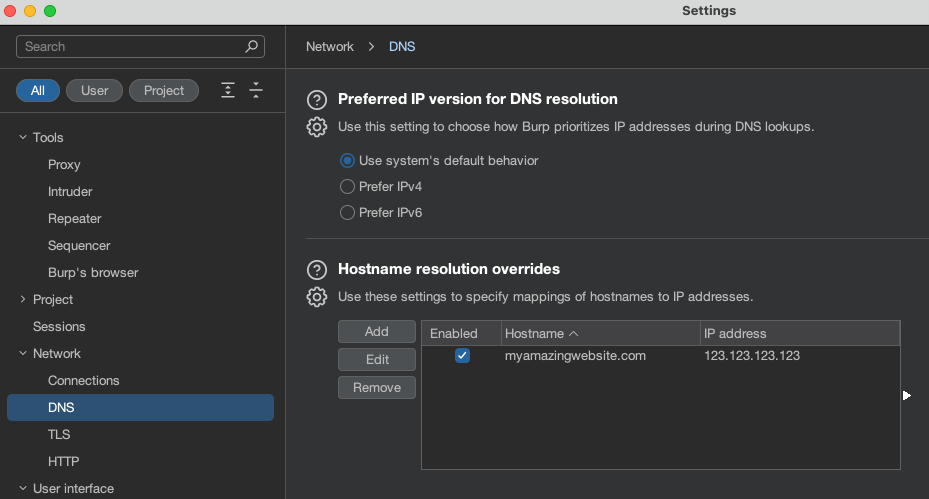
This let me interact with the new site in the burp browser and the old site is still public and reachable on my normal browser.
Bunny CDN#
Since this site was now on a very cheap shared host, I wanted to put a CDN in front of it. 99% of the time when people view the homepage and posts, it’s basically the exact same content anyway. I picked bunny.net since I already host a few things on there, and still very far from hitting the US$1/month minimum charge. Also because bunnies are cute, obviously.
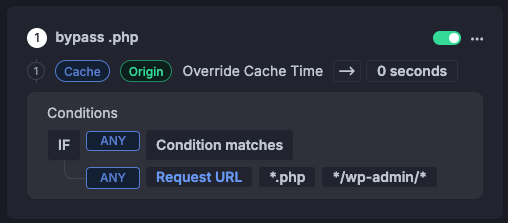
They have a Wordpress plugin, but I didn’t like how it worked. Instead I just set it up to cache everything except *.php and /wp-admin/ requests that the admin/backend use. I might still need it to intelligently purge the cache, will see how it goes.
While they have a whole page for configuring edge rules with a lot of flexibility, it’s not very obvious how to tell it to simply bypass the CDN for certain requests. You need to set Override Cache Time to 0 seconds to have that effect.
Once the migration was complete, I simply had to change the CNAME record from wordpress.com’s myamazingwebsite.wpcomstaging.com to the new bunny CDN myamazingwebsite.b-cdn.net. This leaves my shared hosting origin somewhat obscured and not in any DNS records, even historical.
Performance#
So what does $20 get you compared to $300? I ran some basic Largest Contentful Paint (LCP) tests on my decent home internet. I noticed wordpress.com does seem to have its own caching/warming up, as initial requests would be slower.
| Host | LCP Cold | LCP Warm |
|---|---|---|
Wordpress.com |
3.86s |
1.22s |
NameCrane+BunnyCDN |
4.14 s |
0.34 s |
So it is a bit slower in the cold worst case, but the CDN really makes up for it, and should kick in the most when traffic is spiking. At the levels of traffic we are expecting, we won’t be going over the $1/month minimum any time soon. Just in case I’ve set a monthly limit in bunny, so when openAI’s crawler comes round we won’t get a massive bill.
Another surpising win is the page size. Moving off wordpress.com shrunk it from 3.7MB to 2.66MB. Not sure why or how, the functionality is exactly the same, but it seems wordpress.com adds a lot of it’s own stuff to every page. Converting the header and logos from PNG to webp further shrunk the homepage to 1.21 MB. Not sure why wordpress.com doesn’t just do that on it’s own, it already goes through all the effort of generating new thumbnails for everything…
Comment
- Username, 2026-01-27